| |
|
| |
|
SolidWorks
Education Edition 2009-2010
|
|
|
| |
|
|
3D CAD & Design Analysis Software with Comprehensive Courseware |
| |
SolidWorks in Schools?
Since bringing SolidWorks to the
attention of D&T teachers in 2004, there has been a very
positive response, and now thousands of students have
benefited from its use. We have always been impressed with
its ease of use and power, but it is now gratifying to see
so many schools around the country discovering the many
advantages of using SolidWorks.
Through the CAD/CAM initiative, UK
schools have had their first taste of 3D CAD software,
and D&T has undoubtedly benefited as a result. With this
in mind the time is now right for schools to look for
the best possible 3D software for their students. Whilst
full 3D CAD software of this type is always going to be
for older more able students, good software should
always make access easier. In our opinion SolidWorks
offers students and teachers the best way forward in
developing their use of 3D CAD. SolidWorks Education
Edition provides both students and teachers with
unmatched power, combined with an industry leading easy
learning curve. So if you are committed to full 3D
design but are finding that your current software is too
difficult for your students (and you!) to get their
heads round, now is the time to look at a state of the
art solution, and to see how intuitive 3D design
software can really be.
|
|
|
| |
|
| What is the SolidWorks
Education Edition 2009-2010? |
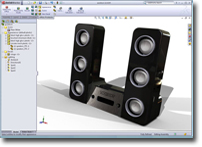
SolidWorks software is the
standard in 3D design and mechanical engineering in thousands of
companies worldwide. Commercially it is not just used for
designing simple 3D objects, but also for advanced part
assembly, physical dynamic calculation, surfacing, enhancing
large assembly performance, etc. But of course if you do just
want to create a simple 3D object, it does a great job!
The SolidWorks Education Edition
2009-2010 is actually a suite of applications, bringing
together the latest in 3D CAD, photo rendering, animation,
finite element analysis, etc., plus a huge library of
standard parts.
SolidWorks Education Edition 2009-2010
includes: |
|
- SolidWorks 3D
CAD Software : the standard in 3D mechanical design
software which allows users to create full 3D models. The
software has unrivalled performance and ease-of-use,
including familiar Windows functions like drag-and-drop,
point-and-click and cut-and-paste. “Heads-up” user
interaction makes the software even more user friendly, by
minimalising visual clutter and reducing the number of
design steps through intuitive work flow.
- PhotoWorks™
: create photorealistic images of SolidWorks models
-
SolidWorks Toolbox: automate assembly tasks with a
library of standard parts
-
SolidWorks® Animator : create compelling AVI files
from SolidWorks parts and assemblies
- eDrawings
Professional: Generate accurate representations of
2D and 3D models that anyone can view, mark up, and
measure without having to purchase their own markup
tools
-
FeatureWorks: Simplify the reuse of 3D CAD
data-created in varied file formats
-
SolidWorks Utilities: analyze designs and compare
different versions of a design
- 3D
Instant Website: quickly make a website featuring
your design
- DWGeditor™
: Edit and create native DWG drawings using DWGeditor
installed inside SolidWorks—users familiar with AutoCAD®
will find the
user interface very familiar.
-
SolidWorks SimulationXpress:
the point-and-click stress analysis wizard built into
SolidWorks 3D modelling software. For teachers and
students with no previous virtual simulation experience,
SolidWorks SimulationXpress guides you step-by-step through the design
validation process - allowing you to explore the
benefits of first-pass design checks without any cost.
-
PDMWorks: Minimize errors and duplicated
efforts by capturing file revision histories
automatically. Access desired files, determine who has
worked on them, and see exactly when changes were made.
-
SolidWorks Simulation
Finite element analysis (FEA).
- SolidWorks Motion
Kinematics and motion analysis.
-
SolidWorks Flow Simulation
Computational fluid dynamics (CFD) and thermal analysis.
The example on the right shows the results of
aerodynamic analysis on a CO2 Car (see Design Projects,
below).
|
|
|
|
|
Stress analysis of a SoildWorks
part
|
|
|
|
|
|
|
Free Learning and Teaching resources |
SolidWorks is an
intuitive piece of software for teachers and students, to
learn and use. However, anyone new to 3D CAD will be pleased
to know that SolidWorks has an extensive number of
interactive tutorials and a ‘Quick Tips’ wizard which guides
you through the software. Also included is the SolidWorks
Education Edition Curriculum and Courseware
materials which are available for
download. These resources are fully reproducible and
include: |
|
|
Teacher Guides: SolidWorks / SolidWorks Simulation / SolidWorks
Flow Simulation / SolidWorks Motion
The Teacher Guides and Student Courseware are designed to assist
you in teaching SolidWorks and COSMOS in your school. The guides
are made up of a number of lessons, which have corresponding
pages in the Student Workbook. They are annotated with
discussion points, suggestions for class demonstrations, and
explanatory information related to the exercises and projects.
Also included are answer keys for assessments, worksheets, and
quizzes.
N.B. The SolidWorks Teacher Guide and Student Courseware is a
companion resource and supplement for the SolidWorks Online
Tutorials.
Hands-on Test Drive: SolidWorks
As the title implies, these guides are a hands-on experience.
You will be using SolidWorks very quickly, and will be
experiencing many of the major capabilities of the software in a
short period of time. |
|
 |
|
|
COSMOSMotion™
Virtual Tour
This is an interactive training system that guides you
through the steps and exercises needed to master powerful 3D
modelling. |
|
|
Design
Projects
Also available for
download are a number of superb design projects, which you and your
students can work through. |
|
 |
|
Other Support
Materials
SolidWorks publish a wide variety of
books and guides for the various aspects of the software. There are
also many books published by independent CAD writers, full of
tutorials and helpful tips on designing with SolidWorks. (You can
also download sample chapters from our
Software Publications page).
Manufacturing
SolidWorks models can be easily exported as stereo lithography STL
files for manufacture on all Roland 3D
capable miller/routers, the TechSoft
RouterCAM range and the Dimension 3D
Printer.
|
|
| SOLIDWORKS FEATURES |
- Instant 3D – a new interface for easier design creation and
revision. Instant 3D allows students to create or manipulate
features of a 3D model by simply clicking and dragging on the
model itself rather than using menus or icons. Visual aids help
ensure accuracy is still maintained.
|
|
- Extensive
curriculum support materials are available to download free of
charge to users of the SolidWorks Education Edition.
- Learn basic and advanced SolidWorks skills
with the extensive on-screen tutorials. The tutorials cover 34
different topics and work interactively with the software.
- Create designs easily with extrusions,
revolves, thin features, lofts and sweeps, shelling, feature
patterns, and holes using unique feature-based part modelling
capabilities.
- Work on large assemblies without having to
load all components into memory. Reference parts directly and
maintain relationships when creating new parts.
- Develop complete, production-ready engineering
drawings without drawing a single line or arc, make revisions easily
and accurately, and generate bills of materials and balloons
automatically.
- Create complex surfaces using lofts and sweeps
with guide curves.
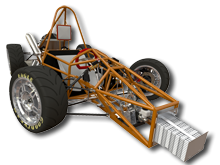
- Create welded structures from a framework of
lines. Add structural members (eg., tubes, channels and pipes)
automatically, defining their size and the corner treatments (eg.,
end mitre/butt).
- Create sheet metal parts quickly and easily in
both flat or folded states. You can switch between a flat or folded
view of your design, at the click of a button. Add flanges and tabs
to your sheet metal part, before automatically generating a 2D
drawing.
- Introduce stress analysis to your students
with the built-in-wizard SimulationXpress. Simple to use, this stress
analysis tool displays stress distribution and part deformation and
can even run an animated simulation.
|
|
MINIMUM HARDWARE REQUIREMENTS
|
|
|
|
| |
| |
|
|
|
| |
Secondary Schools
& FE Colleges |
(All prices shown are in pounds sterling and exclude VAT)
|
| SolidWorks Education Edition 2009-2010 |
|
Stand-alone 2009 |
|
|
200.00 |
|
| School License (60 networked + 1 stand alone) |
|
|
695.00 |
|
|
| Subscription Renewals* |
1 Year |
|
3 Year |
|
| Stand-alone |
67.00 |
|
162.00 |
|
| School License |
|
|
600.00
|
|
|
|
| * When you purchase SolidWorks, you receive a license that permits you to run that version of the software forever. However, SolidWorks is updated annually, and to automatically receive these updates, you need to be on subscription. Network license users on subscription will also have access to the home use version (for students and teachers to use on their home computer). |
|
|
| |
Universities
(also available to Secondary Schools & FE
Colleges)
|
(All prices shown are in pounds sterling and exclude VAT)
|
| SolidWorks Education Edition 2009-2010 |
| Stand-alone |
200.00 |
|
| Network
- 10 User Lab Licence |
665.00 |
|
| Network
- 20 User Class Licence |
1265.00 |
|
| Network
- 30 User Class Licence |
1865.00 |
|
| Network
- 45 User Class Licence |
2531.00 |
|
| Network
- 200 User Campus Licence |
3300.00 |
|
|
Network - 500 User Campus Licence |
3995.00 |
|
|
|
| Subscription Renewals* |
1 Year |
|
3 Year |
|
|
Stand-alone |
|
|
162.00 |
|
| Network (10 Users) |
|
|
615.00 |
|
| Network (20 Users) |
|
|
945.00 |
|
| Network (30 Users) |
|
|
1230.00 |
|
| Network (45 Users) |
|
|
1311.00 |
|
| Network
- 200 User Campus Licence |
700.00
|
|
1722.00 |
|
|
Network - 500 User Campus Licence |
|
|
1968.00 |
|
|
See Also:
Space Navigator (3D Mouse)
|
|
|
SolidWorks Student Edition |
The SolidWorks Student Edition will be of interest to students or teachers who do not have access to the home use version, detailed above *. Eligible individuals can purchase the Student Edition to run on their home computers for personal learning or academic purposes. |
|
|
|
|
|